THE PC INTERFACE REDESIGN CONTINUES
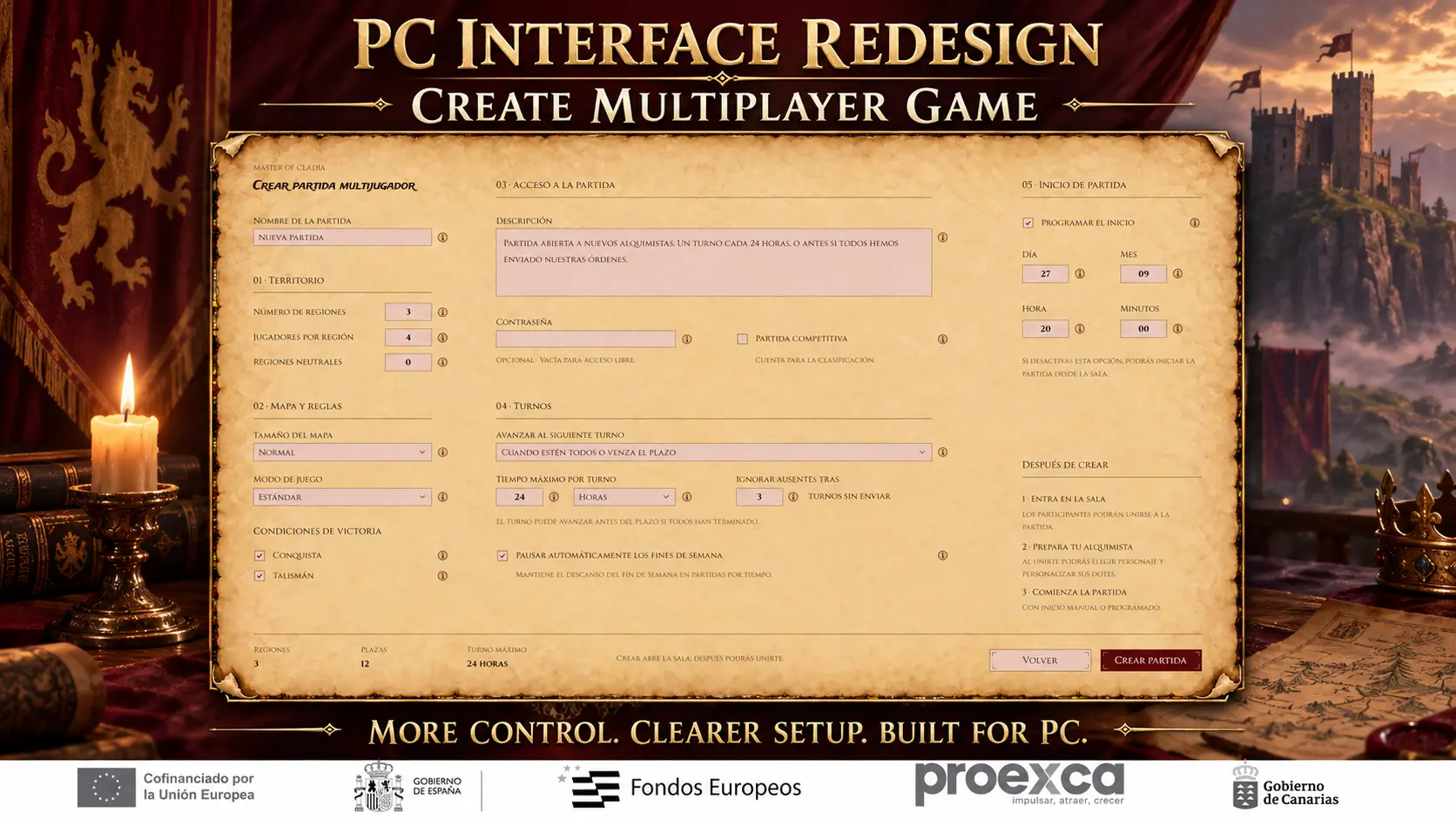
Today we are sharing a first look at the redesigned Create Multiplayer Game screen for the PC version of Master of Cladia.
Creating a multiplayer strategy game involves a considerable number of decisions. Players must configure the territory, map, victory conditions, access rules, turn system and starting time before opening the lobby.
The new interface divides this process into five clearly defined sections:
1. Territory
2. Map and Rules
3. Game Access
4. Turns
5. Game Start
From a single screen, the host can configure the number of regions and players, select the map size and game mode, choose the victory conditions, protect the game with a password, enable competitive play and define how turns advance.
Timed games also include options such as a maximum turn duration, automatic handling of inactive players, weekend pauses and a scheduled starting time.
A summary at the bottom shows the most important settings before the game is created and the lobby is opened.
This interface is being designed specifically for the PC version of Master of Cladia. The existing Android interfaces will remain unchanged.
The design is still a work in progress, so some elements may evolve before release.
What options do you consider essential when creating a multiplayer strategy game?
Wishlist Master of Cladia on Steam:
https://store.steampowered.com/app/3732690/Master_of_Cladia/



Comentarios (0)
Deja un comentario